nf-metro
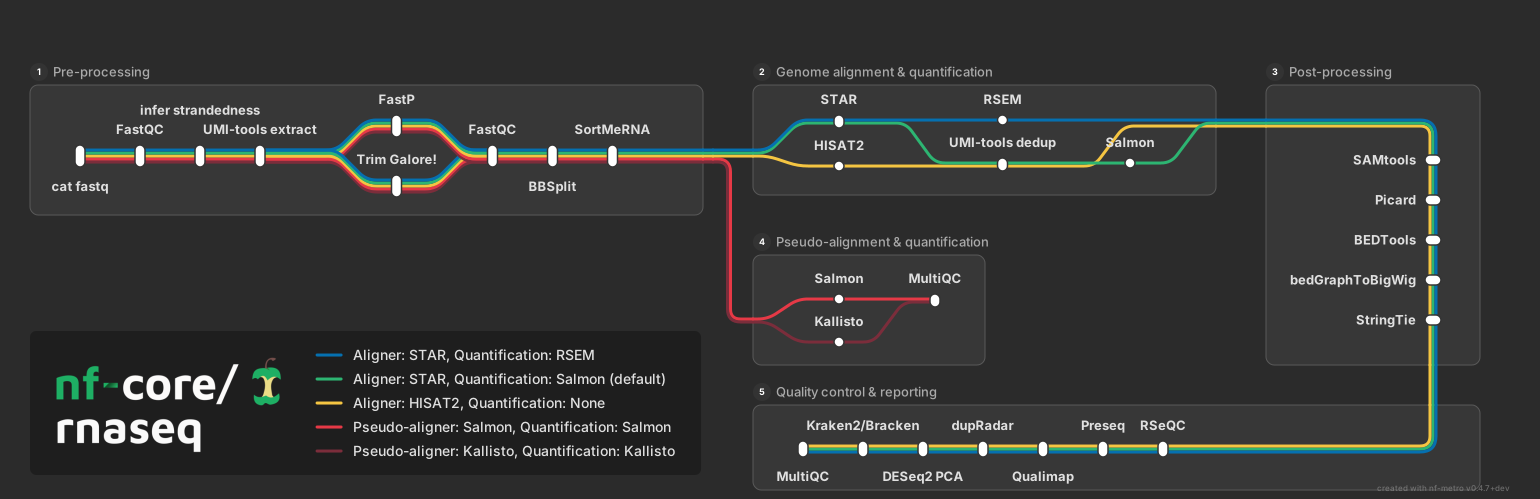
Generate metro-map-style SVG diagrams from Mermaid graph definitions with %%metro directives. Designed for visualizing bioinformatics pipeline workflows (e.g., nf-core pipelines) as transit-style maps where each analysis route is a colored "metro line."
Installation
pip (PyPI)
Conda (Bioconda)
Container (Seqera Containers)
A pre-built container is available via Seqera Containers:
Requires Python 3.10+.
Quick start
Render a metro map from a .mmd file:
Validate your input without rendering:
Inspect structure (sections, lines, stations):
CLI reference
nf-metro render
Render a Mermaid metro map definition to SVG or interactive HTML.
| Option | Default | Description |
|---|---|---|
-o, --output PATH |
<input>.<format> |
Output file path |
--format [svg\|html] |
svg |
Output format: svg or interactive html |
--theme [nfcore\|light] |
nfcore |
Visual theme |
--width INTEGER |
auto | SVG width in pixels |
--height INTEGER |
auto | SVG height in pixels |
--x-spacing FLOAT |
60 |
Horizontal spacing between layers |
--y-spacing FLOAT |
40 |
Vertical spacing between tracks |
--max-layers-per-row INTEGER |
auto | Max layers before folding to next row |
--animate / --no-animate |
off | Add animated balls traveling along lines |
--debug / --no-debug |
off | Show debug overlay |
--logo PATH |
none | Logo image path (overrides %%metro logo: directive) |
--center-ports / --no-center-ports |
off | Centre inter-section ports on the shorter of the two connected sections |
--from-nextflow |
off | Convert Nextflow -with-dag input before rendering |
--title TEXT |
none | Pipeline title (used with --from-nextflow) |
Interactive HTML output
--format html produces a self-contained .html file with the SVG inlined plus a small JS/CSS layer (no external dependencies, no network):
The page supports drag-to-pan, scroll-to-zoom, station hover tooltips, and a clickable line legend. Clicking a line isolates it: stations and sections not carrying that line are hidden and the view zooms to the bounding box of what remains. Click again, hit Esc, or use the Reset button to restore.
The Embed… button opens a panel with three copyable snippets:
- Inline HTML - a self-contained
<div>you paste into any HTML host (MkDocs, Confluence, Notion, blog templates). Keeps full interactivity, no iframe. - iframe - a one-liner pointing at the hosted
.htmlfile. - Static SVG - the raw
<svg>markup for hosts that strip scripts.
GitHub READMEs strip <script> tags, so embed there as a static SVG (or link out to a hosted version). Most static-site generators and internal wikis run the inline-HTML snippet as-is.
nf-metro convert
Convert a Nextflow -with-dag mermaid file to nf-metro format.
| Option | Default | Description |
|---|---|---|
-o, --output PATH |
stdout | Output .mmd file path |
--title TEXT |
auto | Pipeline title |
See Importing from Nextflow for details and examples.
nf-metro validate
Check a .mmd file for errors without producing output.
nf-metro info
Print a summary of the parsed map: sections, lines, stations, and edges.
Writing metro maps
Read the Guide to learn how to write .mmd files, from minimal examples to multi-section pipelines with custom grid layouts.
Gallery
See the Gallery for rendered examples covering simple pipelines, complex multi-line topologies, fan-out/fan-in patterns, fold layouts, and realistic bioinformatics workflows.